II transaction CSVs can be in either £ or $USD.
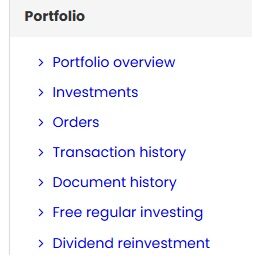
In the browser on your PC (not the mobile app), scroll down to the site map at the bottom of the page and select ‘Transaction History‘.
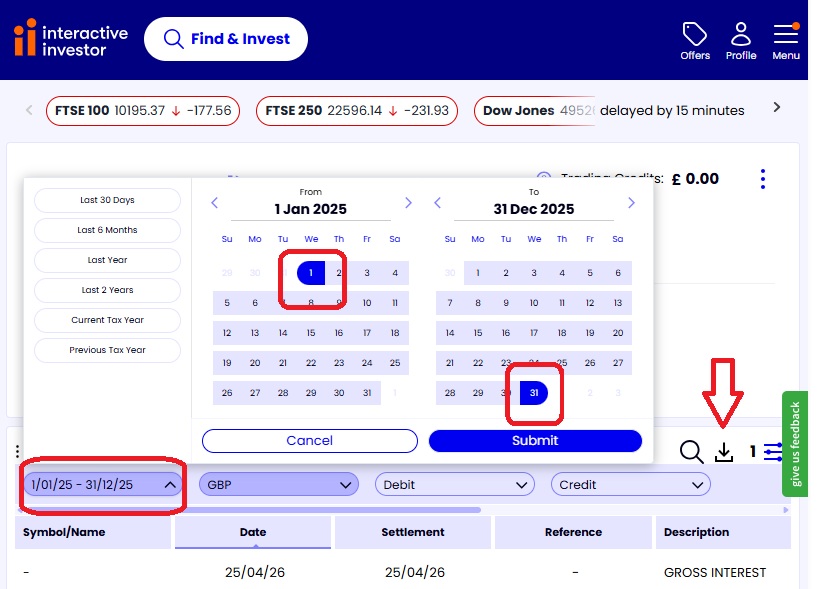
Select the Trading Account and change the date range (max 24 months). Start from when you opened the account to 31 Dec and save as .csv. Do 12 onths or 24 months at a time. For the ast file, the last date must be as lest 7th May of this year – specify the dates in the file name. e.g. ii_firstday_to_end_2022.csv ii_2023_to_2025.csv ii_2025_to_10May2026.csv.
Example .csv
Date,Settlement Date,Symbol,Sedol,Quantity,Price,Description,Reference,Debit,Credit,Running Balance
21/11/2023,23/11/2023,IITU,B456TR0,527,£18.90,527 ISHS V Del 18.89 S Date 23/11/23,257723S5HRNL,”£9,962.63″,n/a,£37.37
29/11/2023,01/12/2023,GBSP,B7VG2M1,186,£10.69,186 WISE HDG0 Del 10.68 S Date 01/12/23,277523S5QDR7,”£1,991.85″,n/a,”£8,045.52″
05/12/2023,07/12/2023,BKCG,BMQ86K3,178,£5.59,178 GLOL X Del 5.59 S Date 07/12/23,277523S5ZW5K,£999.19,n/a,”£7,046.33″
06/12/2023,08/12/2023,IUCM,BDDRF47,487,£7.63,487 ISHS V Del 7.62 S Date 08/12/23,277523S56QRR,”£2,997.05″,n/a,”£4,049.28″
14/12/2023,18/12/2023,SWDA,B4L60Z9,56,£70.68,56 ISHS MSCI WLD A Del 70.67 S Date 18/12/23,277523S6HLG5,”£3,961.90″,n/a,£87.38
21/12/2023,27/12/2023,IITU,B456TR0,525,£19.32,525 ISHS V Del 19.32 S Date 27/12/23,277236S6X7HR,”£10,148.30″,n/a,£8.41
21/12/2023,27/12/2023,SWDA,B4L60Z9,140,£70.90,140 ISHS MSCI WLD A Del 70.90 S Date 27/12/23,277323S6X7CS,”£9,930.67″,n/a,”£10,156.71″